Friday, March 7, 2014

Interesting Speed Observation Using a Simple Ruby Script

One day I was a little bored and thinking about a simple speed test, which I quickly threw together and previously posted about. The thing is that I saw some inconsistencies in speed depending on how I was connected to the machine.

Here's the Ruby script I threw together:

for n in 1...1000000 do
        puts "#{n}"
end

Other pertinent information: 
Ruby version: ruby 2.0.0p247 (2013-06-27 revision 41674) [universal.x86_64-darwin13]
OS X version 10.9.2
2.4 GHz Core 2 Duo
4 GB RAM

Before leaving the office, I connected to the test machine through SSH. This is a straight SSH connection from a terminal, no VPN or anything like that. I ran the script with a simple

time ruby ./rubytest.rb

Results when SSH'd in:
Run 1:
real 0m54.064s
user 0m5.020s
sys 0m3.501s

Run 2:
real   0m53.146s
user   0m5.134s
sys  0m3.451s

Run 3:
real 0m54.862s
user   0m4.986s
sys 0m3.356s

Once I got home I ran the script on the terminal locally.
Run 1:
real   0m16.106s
user   0m5.324s
sys    0m3.840s

Run 2:
real   0m15.469s
user   0m5.307s

sys    0m3.771s

Run 3:
real   0m15.293s
user   0m5.344s
sys    0m3.750s

Was this something introduced by using SSH? I used SSH to connect to localhost and tried again...
Run 1:
real   0m10.477s
user   0m5.016s

sys    0m3.327s

Run 2:
real   0m10.894s
user   0m5.092s

sys    0m3.382s

Run 3:
real   0m11.278s
user   0m5.112s

sys    0m3.403s

I don't know the reason for this exactly. The amazing part was connecting to SSH locally and having it speed up the script. All I can figure is that SSH is compressing console output, and when I'm connected over the Internet the connection is still lagged but connecting from localhost gives an advantage despite processing overhead of the compression, and Ruby is somehow constrained to how fast the data can be dumped into the console (maybe it waits for some kind of acknowledgement that output is actually output before moving to the next calculation?)

For me it's speculation. I'll have to see if I can find answers somewhere.

NINJA EDIT: I posted the question to unix.stackexchange.com and got some excellent answers!

Monday, March 3, 2014

System State Preservation (Deep Freeze, Fortres 101 and Clean Slate)

When I talk of system state preservation, I mean you want a system that is treated kind of like a turn-key kiosk. A locked down workstation, if you will.

I worked in a school environment for several years, and if there's one thing students love to do, it's destroy things. I've seen some outrageously entitled behavior before, such as the destruction of phones because certain teens have Mommies and Daddies that will buy them another after carelessly spider-webbing the touch screen. But some still manage to take it a level higher when they are using property that isn't theirs, such as school computers. I mean...yikes.

Sometimes it's not even malicious, it's just stupid. I won't get into the configuration and management issues involved in the politics of how much to allow installed on systems or user privilege levels that enables installation of software. Suffice it to say that when you manage an environment where you have hundreds of users and only a few staff to oversee them, there are compromises made.

That led to my experience with Deep Freeze from Faronics. Kind of neat, really. It seems to work by taking a snapshot of the system state when you "freeze" the workstation, then every disk write is written as a diff from the snapshot. Reboot, and the system rolls back to the snapshot.

Pro? It felt great to delete most of the Windows folder and still have the machine boot. Very cathartic. Oh, and it let students destroy the data on machines without the effect being permanent. We also had a kind of control console that gave a status of workstations in the school network, and we could remotely freeze and thaw systems from that. Or reboot them. Remotely update the Deep Freeze files by pushing updates. That sort of thing. Still...good to destroy Windows on a bad day.

We had a situation once where malware was spreading on several systems. From the console we told all the machines to reboot at the same time...the malware was gone. Changes students made that they didn't save to their network home drives or a USB drive? Well, that went away too. Listen to the messages we send out or you lose stuff. Whoops.

Cons? Anything automated for updates, like Windows update, would get very, very confused. Push out an update, poll the workstation and it's updated, next day...it's not updated anymore. Same goes for antivirus. Oh, sure, there was a function built into Deep Freeze so you can define a "maintenance period", where the machines would reboot and for a period of several hours the machine was "thawed," meaning changes were allowed and permanent until it was in a "frozen" mode again. The problem is that this was not always reliable. Sometimes Windows Update didn't finish in the allotted time. You know what happens if you (automatically) reboot when it's still updating or something was stuck? Yeah, whoops.

Or Deep Freeze would be in a mode where it was thawed until X boot cycles. You know that thing Windows will do where it says, "Oh, stuff is in use. Let's reboot, and at startup we'll update those files!," then it sets a reboot flag and restarts? Only if the bad timing fairy showed up, that reboot means the system is frozen. So it reboots, Deep Freeze freezes, Windows does the update, then reboots automatically to the frozen-in-need-of-updates-at-startup image, and Windows proceeds to update and then reboot again and this continues ad infinitum, requiring some fun hoops to jump through to disable the stuck-cycle because by the way, Deep Freeze was specifically made to prevent kids in schools from screwing with the image.

And of course there were glitches. We occasionally had systems that would report themselves as thawed, but the management console would say it was still frozen. And vice-versa. It would usually take a reboot cycle or two via the console to convince the systems they should revert to the desired state.

Overall Deep Freeze worked well to create a computer that wasn't easily broken by the students. We could create directories and open registry hives to full access for users, so they didn't get errors when trying to use the machines. Keeping systems patched to the latest level wasn't quite as pressing since any malware finding its way to the workstation would disappear at reboot. Relying on this mode of protection, of course, meant that the systems were extremely vulnerable when the systems were thawed for maintenance, since we gave up trying to get antivirus to behave properly using Deep Freeze.

If you have an environment where you are trying to prevent people from actively destroying your system configurations, or accidentally destroying them, Deep Freeze works. It shines in a "lab" environment where you want sets of systems with a heterogeneous configuration that stays intact when you are too grossly understaffed to properly monitor them.

 Fast forward to today. I have a request to configure a small number of systems for use as a sort of communication appliance. We aren't trying to lock out configuration changes for the sake of locking people out, or fear that people will intentionally try to reconfigure the systems. Instead the aim is to lock systems into a simplified configuration, so they can be used with minimal training or worry they'll make permanent configuration changes that will confuse other users or break functionality. Additionally, we want to make it hard for people to accidentally misuse systems in a way that will allow someone access to documents with sensitive data.

Deep Freeze could work, but it would still require a lot of extra configuration to try to lock systems down into a simplified interface. I was looking for something that locked down system configurations but also could manipulate the interface to restrict the number of options people had when using the computers. I needed turnkey "appliances."

After a little digging around I discovered there seems the be relatively few players that managed to get traction in this field. There are several small applications available similar to Deep Freeze, according to the Wikipedia page, but none that seem to be really popular.

So I decided to test a combination of two products called Fortres 101 and Clean Slate, both made by the same company. Presumably this would mean they would work in a complementary fashion (indeed, when I got the install CD's, the CD appears to have several of their products available and differentiated only by the licensing key, reminiscent of the Windows install where you get every version of Windows from Home to Ultimate, but the version you actually activate depends on the activation key entered in setup.)

Fortres 101 is aimed at securing the computer; I can configure it to hide the Start menu, prevent the system tray icons from working, prevent access to particular folders and/or allow particular applications to run. It also allows for a Kiosk mode, where the computer will launch, log in, and run a particular application as the interface. There's a long list of options that can be allowed and disallowed, along with options for security to apply to just users or users and administrators alike (I wonder how hard it is to accidentally lock out all access to the computer?)

Clean Slate is more directly analogous to Deep Freeze; when active, changes to the computer are reverted to a pre-enabled state.

I alluded earlier that the installs for all the Fortresgrand software was included on the application install CD; my impression is that their products are made to be modular enough to be standalone, but intended to be used all together as you purchase licenses. When I activated Fortres and Clean Slate, launching the administrator application...the interface for modifying the configuration to the protection programs...both appear on the same application, just integrated into a tree structure on the left side of the configuration program. By reading through various options, I eventually created a state where the computers seemed to act close to the envisioned appliances in functionality.

But there were problems.

The kiosk mode was supposed to allow the system to boot up, log in as a user, and present a program as the interface. I tried getting it to launch a web page for menus to launch other programs, but that didn't work; I deactivated kiosk mode, but it still logs in as the regular local user at startup. I like that it does this automatically, but why is it doing it, when the kiosk mode tree is not enabled? Is it a feature that, behind the scenes, is treated as another feature in a list of available options, while the UI presents it as a part of a branch in the option tree like it's a "related function" for kiosk configuration?

Or is something broken?

These machines, when worked on for maintenance, be accessed remotely. The configuration process was therefore carefully done through accessing the administrative drive share and RDP. Even though I had it set not to enforce rules for administrators...and I'm a domain administrator on the network, and when I had restrictions in place for users the interface was clearly different between my login and the local user login...I couldn't copy files to the machine's drives when accessing the system as me. From the description, I should have been able to do this; I'm an administrator, after all. And it must see me differently, since user interface restrictions didn't apply when I logged in and I could clearly see they weren't enforced.

So why couldn't I copy files?

Then there were obvious bug-related issues. A big one; the Start menu, which as a user was supposed to give me just options to log off or reboot rather than actually present a menu, started giving me a message that Explorer had crashed. It relaunched Explorer and the menu was now appearing for users. After giving that error message over several restarts, it stopped giving that error, but now the user gets a the Start menu when clicked, and I haven't figured out how to get it back to the previous setting yet.

I don't know what mechanisms are used to manipulate the OS. I infer certain details from observed behavior, but I think the companies keep things quiet to keep their implementations proprietary. For example, I remember using GPO many moons ago to prevent access to certain drive letters. Then I ran a file manager...perhaps it was File Manager from a previous version of Windows, my memory is foggy...and the locked out drives appeared. Apparently GPO was just bit-flipping settings in the registry where Windows Explorer checked what it was supposed to do; GPO wasn't affecting the operating system itself.

Deep Freeze allows changes at the drive level; you could create a "thawspace" to save data across boots, or specify which drives to freeze if you want to leave a drive persistent across boots. Fortres and Clean Slate seem to allow specification of drives you can save to, for selective persistence; if that's the case, it would seem to follow that Deep Freeze is monitoring drives and erasing a diff-like image of changes from your session while Clean Slate is doing something more along the lines of monitoring file and directory access. Someone even made a comment to this effect on a blog but I don't know how they gleaned this information, so I kind of take it with a grain of salt. I wonder if it's inaccurate though, given that the website makes a claim that sounds like Windows Updates work according while F101/CS is active.

From http://www.fortresgrand.com/products/cls/cls.htm
Everything in my interactions with Deep Freeze indications a snapshot-like behavior, while the information on the Fortresgrand site seems consistent with some kind of logging of file changes...journaling...behavior that rolls back a restart or logoff.

So does Fortresgrand work using a combination of registry changes and policy enforcement from its own driver(s)? Or is it entirely self contained? If I had enough time I might be tempted to try digging deeper into the inner workings. Part of me is a little worried that this journaling model isn't as secure as the snapshot-diff method. What dictates that a file is a critical update allowing a system update? Or what if something is incompletely or improperly labeled, allowing a partial alteration, leading to system compromise or corruption?

That leads me to the big head scratcher while trying to use our test prototype appliance systems. I configure the systems then hand them off to a project manager to test out, as he has the ultimate vision for how these are to function. He hands the prototype back with some notes on tweaks, which I try to implement and repeat until he gives the final okay and I move to the next milestone, create the system image to clone out.

The past several weeks, I've been nailed by Windows Updates that wouldn't apply. It seemed quite random, but there were 2 or 3 (the number would change depending on the reboot, but usually that was an MS anti-malware update tacked on to the 2 that kept re-listing and failing. I have no direct proof that F101/CS was the direct cause, but there was something definitely corrupted. 

I disabled F101. I triple checked CS was disabled. I tried installing from safe mode. I even uninstalled F101/CS, after carefully saving the settings to exported files since there was no way I could reproduce my settings (fun fact: a file identification utility thinks F101/CS uses SQLite 3.x in the back-end) and re-ran updates, but still they failed.

There is a "system imaging" mode that was discussed in a blog entry by someone having trouble installing a service pack; apparently the system imaging label is actually a way to tell F101/CS to disable the driver at reboot. It didn't fix his problem, and it didn't fix my problem either, unfortunately.

I eventually got on the right track to a solution thanks to someone who wrote up a similar problem in their blog; corrupt and missing files in the update manifests. I've definitely not run into this problem before, and it's certainly possible that this was coincidental with my other file access oddities while trying to update and configure the system with F101/CS running. But could F101/CS have corrupted something in the update process? It's unfair to blame it without direct evidence, but I think it's fair to suspect it had a hand in it.

I was a little more suspicious of its behavior when I reinstalled F101/CS. They both asked for my license, and I was afraid that reinstallation would eat up a total of 2 of X licenses despite this being a reinstall on the same hardware (I hated the prospect of having to call the company and explain we needed the licenses back...)

But nope. It knew the installs were reinstalls. It informed me I had X-1 licenses left.

More than that, it had my previous settings still set. All my custom settings. The uninstallation didn't fully erase the application, apparently. I'm always a little antsy when dealing with applications that don't fully uninstall when I tell them to.

In Conclusion...

The intention of the security settings and state preservation wasn't to lock people out, it was to create a system that defaulted to behavior that made it easier to use for a certain set of applications and discouraged accidentally leaving sensitive documents on "public" systems. 

There's a lot of settings that allow such customization in F101/CS. I'm a little leery of what appears to be the underlying implementation, and the access quirks I hit when trying to copy files was a little annoying. I am also troubled by the corrupted manifests in Windows Updates.

If I were trying to use system state preservation in a lab environment, I think I'd stick to Deep Freeze. If Windows had better support for configuring a system to be locked down into a pseudo-kiosk mode, I'd probably have used Deep Freeze to round out securing these systems. Instead I'm relying on the hope that F101/CS would step on each others toes less than, say, combining F101 with Deep Freeze. 

If you've run Deep Freeze, Fortres 101 and/or Clean Slate, I'd love to hear your experiences. Were the issues I ran into an anomaly? Am I right to suspect something a little wonky going on with the implementation? Anyone have insights on how these applications work behind the scenes? Please do share in the comments...

Next...I hope I won't run into too many problems trying to image these systems...

Friday, February 28, 2014

A Speed Comparison Born From Curiosity (GoLang and Ruby)

I was a little curious about the speed of a Raspberry Pi versus my older model MacBook Pro.

The Raspberry Pi is the B model with 512 MB of RAM and a 700 MHz processor which Linux is reporting as an ARM6-compatible processor (CPU: ARMv6-compatible processor [410fb767] revision 7 (ARMv7), cr=00c5387d).

The MacBook Pro is a 2.4 GHz core 2 duo running 10.9.1 with 4 GB RAM.

I wasn't looking for anything necessarily in depth as a benchmark. I simply whipped up a quick counting loop in Go (1.2 release) and compiled it for Darwin and another for ARM. Ran each with the time command. Here's the source:

package main

import "fmt"

func f() {
        for i := 0; i < 1000000; i++ {
                fmt.Println(i)
        }
}

func main() {
        f()
}

Results?

On the Mac:

real 0m9.875s
user 0m0.922s
sys 0m1.709s

On the Raspberry Pi:

real 12m41.821s
user 1m56.220s
sys 3m43.170s

...holy crap.

I mean, I expected a difference, but I guess I didn't expect quite that much of a difference.

Wow.

If I round the Mac to 10 seconds and the Pi to 760 seconds, that's saying the Mac is 76 times faster at executing this loop using Go.

When I wanted to play with programming I originally I was going to use Ruby. What if I created a stupid simple Ruby loop that counts to the same number? The source:

for n in 1...1000000 do
        puts "#{n}"
end

Yes, I know there's a preferred syntax that I didn't follow for Ruby, I was just throwing a quick throwaway loop at 2 in the morning. Don't judge me.

The results?

On the Mac:

real    0m16.523s
user 0m5.210s
sys 0m3.543s

On the Raspberry Pi:

real 9m23.992s
user 2m10.790s
sys 1m55.610s

Well, this is interesting.

The Mac was about 17 seconds. The Pi was about 560 seconds. That means the Mac was about 33 times faster.

The Mac was 76 times faster with Go but only 33 times faster with Ruby.

Does this really mean anything? Not really. There are other things at play that could affect the speed of the applications; these platforms are really very different beasts. All you can really say is that the Pi is relatively slow compared to an older-generation Mac. Kind of expected. The only surprise is the magnitude of difference.

Multiple runs of the application and script weren't even entirely consistent; probably due to caching, or background tasks eating processor cycles when I wasn't aware of it (if I really wanted to control conditions I'd run this several more times, recording each time, and make sure my OS was doing as little as possible while conducting the test and not having, say, a web browser open.)

(NINJA EDIT - this may be more due to implementation of the code used to write output to the console and to what degree I/O is blocked in the process. See near the end of the post for my second NINJA EDIT.)

Just for giggles, I tried running the tests on another Macintosh; this one a MacBook Pro with 16 gig of RAM and a 2.6 GHz core i7 processor. The Go executable clocked in with:

real 0m4.559s
user 0m0.587s
sys 0m1.049s

...and the Ruby script hit with:

real 0m6.170s
user 0m2.945s
sys 0m1.956s

Anyone have an explanation for why I got these results? Feel free to leave a comment.

NINJA EDIT:
After further goofing around and posting about this on Stack Exchange, I had speculated that output to the console was somehow blocked for Ruby, and the answers seemed to confirm that (at least for Ruby. Ruby I/O is apparently a blocking operation most of the time?) I should have thought of this before, but they suggested that the best way to get the run-time was to redirect output to /dev/null.

So, using "time <executable> >& /dev/null", I got the following results:

On the 4 GB, 2.4 GHz Mac:
The Go executable:
 real 0m1.416s
user 0m0.752s
sys 0m0.575s

The Ruby script:
real 0m1.242s
user 0m1.170s
sys 0m0.030s

Now for the Raspberry Pi:
The Go executable:
real 0m17.345s
user 0m14.620s
sys 0m2.700s

The Ruby script:
real 0m34.479s
user 0m34.360s
sys 0m0.060s

Well...wow? That "puts" operation must really be hindering the Ruby script. Ouch! And that Go executable...Just wow. That is really, really fast, compared to when I run it to the console instead of redirecting output.


Monday, February 24, 2014

Updating Go (GoLang) From Source

I previously posted an article explaining how to install Go on a Raspberry Pi with cross-platform support. If you're like me (and depending on the platform), you're probably used to installing programs through packages, app stores, or single-file MSI installers or setup executables. Or on Linux platforms like Raspbian you first turn to the repos used by apt. Don't feel bad. These methods were invented to prevent DLL Hell, bit rot, or dependency problems. Sometimes they make the chore of keeping your system up to date a little easier.

The method I used was the tried-and-true UNIX way of doing things..."Compile From Source," sometimes referred to as the "Dammit Why Won't This Work" method. I have to admit, though, Go actually worked pretty well, meaning the maintainers of the code base are doing a really find job at taking care of their stuff.

But what if you want to update to the latest version? The version I installed in the post was a development version, meaning that as the devs are updating the code base with latest features and fixes, that was what was getting compiled on my Pi.

But what if I wanted to update? Or use the official stable release version, which is the version that is more or less tested to be...well, feature stable?

Turns out it wasn't that hard to get up to date.

First, I run screen. Mainly because I'm SSH'd into the Raspberry Pi, and since the steps can take awhile, if something disconnects me I don't want the process to be interrupted. Then I start the process thus:

cd go/src
hg pull
hg update release
./all.bash

This step took awhile as the Raspberry Pi worked on compiling the Go source.

Now for the cross-compile tools.

source golang-crosscompile/crosscompile.bash
go-crosscompile-build-all

This step will take longer than the initial compile. That's why I used screen...I can use Ctrl-a/d to detach from my session and check the progress later. 

Once the compiles are all finished, though, you should be able to

go version

...and have the prompt reply with:

go version go1.2 linux/arm

Monday, February 17, 2014

First Time Playing With Version Control (Git)

Version control. Not typically covered in beginner programming courses. I'm not sure if it's ever really covered unless you get a programming job with a team where you're forced to use some method of sharing and distributing your work, and even then I've run into stories where startups come up with some organically grown in-house methods of avoiding proper version control.

What is version control? It's more or less as the name implies. Version control applications allow you to save different versions of your application source so you can roll back changes to different points in time. Screw up a new set of patches? Roll it back. Want to experiment with an experimental feature? Branch the source to create a parallel version of your application. If it works, you can merge that branch with the "known good" version. Or if it's a one off, you can create the new function and roll everything back if you change your mind (although the branching method is preferred.) Version control makes it simple to track your progress and the history of your application development.

Since I was playing with Go starting from scratch it may be a good time to at least try to expose myself to the basics of Git. The Raspbian install already had Git installed from repo, probably as a requirement for another package. The Git site has instructions for installation on your platform of choice (although if you're running Linux, I'd suggest a Google search for installing Git on your distribution of choice.)

Actually using version control is a little irritating in that it adds more steps, but isn't horribly cumbersome. Once I had created a source code file, I ran:

git init

...from the root of the directory I am creating my source code in. This creates a local Git repo in a hidden (on Linux and Unix systems) .git directory. Every change you commit is placed into a structure under the .git directory, making it really convenient to back up or start your version control from scratch if you decide to do so for some reason.

Then you tell Git that you want to add files to the local repo.

git add .

That tells it to just add everything, folders and files and all. You can add specific files by changing the period to a filename. You can get a status using

git status

...which in my case replied with:

# On branch master
#
# Initial commit
#
# Changes to be committed: # (use "git rm --cached <file>..." to unstage)
#
# new file: hello_world.go
#


This tells me I'm working on the branch called master and it's ready to add the file hello_world.go to the local repo. It hasn't done it yet, though. First, I configure a couple of items that get added to my commit metadata:

git config --global user.email "me@me.com"
git config --global user.net "My Name"
git commit

The commit command tells git to actually put the files in to the version control system. Git opens a simple text editor and at the top I enter a line to describe my first commit message. When I exit, the console replies with:

[master (root-commit) ac7121a] Created first hello world source file
1 file changed, 9 insertions(+)
create mode 100644 hello_world.go


The comment is at the top of the commit; "Created first hello world source file." Now I make a few alterations (experimenting with the workspace of a Go project, figuring out the directory structure), necessitating telling Git I added a few items.

git add .
git commit -m "Changed directory tree structure"

The "-m" adds the comment in the command line rather than bringing up a text editor. I'm not entirely sure that the "add ." does anything significant when I just created some directories since Git only replies with,

[master 708b35d] Changed directory tree structure
1 file changed, 9 insertions(+)
create mode 100644 src/hello_world.go

I made a few more changes while experimenting with my first Go program. Then I went back to the root of my project tree and ran a few Git commands.

cd ..
git add .
git status


# On branch master
# Changes not staged for commit: # (use "git add/rm <file>..." to update what will be committed)
# (use "git checkout -- <file>..." to discard changes in working directory)
#
# deleted: hello_world.go
#
no changes added to commit (use "git add" and/or "git commit -a")

git commit -m "Added a bin directory to tree"

At this point nothing seemed to be logged as a change. Using the command 

git log

...seemed to verify this. I theorize that if you alter directories, it doesn't seem to care. If you actually alter files, then Git notices and adds it to the repo. Maybe someone with more experience could validate that this is Git's behavior. 

I then go ahead and create a binary of my Go application then tell Git to commit the latest set of changes. I back out of my binary folder in my workspace and give Git some commands:

cd ..
git add .
git commit -m "Built the binary"

[master 3aeb831] Built the binary
1 file changed, 0 insertions(+), 0 deletions(-)
create mode 100755 src/hello_world

git log


commit 3aeb8311138035b4e46b75f9b2251a2c526b39a4
Author: My Name me@me.com
Date: Sun Feb 2 13:14:59 2014 -0500
Built the binary
commit 708b35d1e716feaf0562e8adbcc2e26c53292bb0
Author: My Name me@me.com
Date: Sun Feb 2 12:57:17 2014 -0500
Changed directory tree structure
commit ac7121a7b8a95a08d95a4e421f0dd87fec0a11af
Author: My Name me@me.com
Date: Sun Feb 2 12:41:26 2014 -0500
Created first hello world source file
...here you see that "git log" tells you the history of commits, with the comment, date, and person who made the changes.

This covered the basics of creating a local version repo, committing your changes, and getting a status of your commits. Not too hard; if you're using the command line, it usually means having to remember periodically commit with a quick note of what changes you had made.

Git has several other functions available and this only covered the basics of starting with Git. I haven't played with branching, and nothing here displayed how to roll back changes. A near future blog entry will review another feature of Git, but for now this is enough to absorb into the "what am I doing" part of the brain.

Monday, February 10, 2014

For a Gift I Gave a Memory...and a MacBook

Valentine's Day is coming up. A coworker sent a tweet regarding, from what I can infer, Apple having an ad for iPads as Valentine's gifts. I replied to her with a link to a story about a guy that bought an iPad and carefully wrapped it, dipped it in chocolate, and re-boxed it so it appeared to be an iPad shaped chocolate, only, SURPRISE! It's an actual iPad.

It reminded me of surprising my wife with a new MacBook several years ago, although it wasn't chocolate dipped. For the money spent on these, I wouldn't have had the cojones to try covering something like a laptop with chocolate. I replied to my coworker telling her she should ask me about it sometime, this surprise to my wife, and much to my surprise, she actually did ask a few nights later; usually it seems my coworkers take little interest or followup in my activities so I figured online social graces would be soon forgotten. I guess it's safe to say my coworkers still surprise me once in awhile.

My recollection was...not the best in storytelling. It was jumbled a bit as my memory is much more affiliated with a sieve than an elephant. Afterwards I contacted my wife and asked her recollection of the story. She didn't really tell me much of the actual escapade, but said, "I still have the box and the notes. And the clues."

I didn't know she had kept all of that. I felt another twang in the miss-you center of my brain, followed by a surge in the sadness center of my chest. But it warmed me to know she still had these things.

Soon my email notified me of incoming messages. Scans of the notes I took.

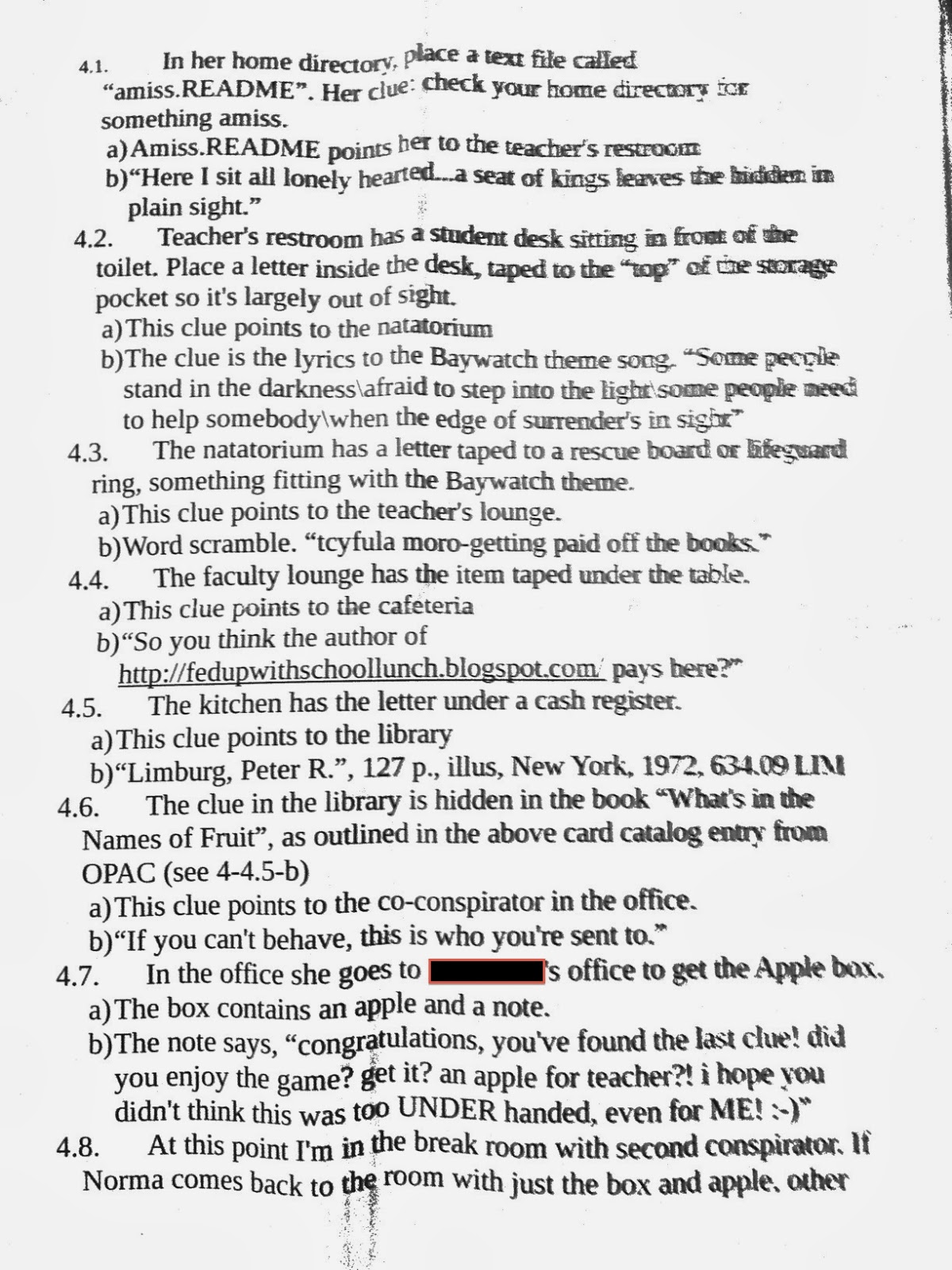
See, when I planned all of this initially, I actually took the time to write an outline of what to do. When I was a kid, on a couple of occasions my Mom bought a toy or...I don't remember what, exactly...and hid it. She would then leave notes in certain spots and give me the initial clue.

It probably says something that I don't remember what she gave me as a reward but I do remember searching around the yard and house trying to solve the clues on these pieces of paper.

What I ended up doing was hiding clues around the high school where my wife worked, and sending her on a scavenger hunt of sorts. Waiting at the end was a shiny new Macbook Pro. She still uses it today.

For reference, here are the notes I had written for outlining the adventure.


My hope is that when the laptop finally reaches the point where it must be replaced, she'll still remember this story, and will remember it fondly.

Love you Norma!

Sunday, February 2, 2014

Installing Go (GoLang), With Cross-Compile Support, on a Raspberry Pi

I've written previously that I was working on playing with programming languages. For reasons I won't bother getting into in this post, I decided I wanted to play with Google's new flagship language, Go.

For a playground in which to experiment, I decided to use a Raspberry Pi running Raspbian 3.10.25+ (Wheezy) at the time of these instructions.

First, there was a version of Go in the apt-get repo. I installed it and discovered it was running version 1.0.x. I love the package management system, since it keeps things up to date without worrying so much about cruft and dependencies. But the downside is that getting new versions of packages means waiting until package maintainers get around to upgrading everything. Once I saw the version of Go installed by apt-get, I ran apt-get remove.

From there I followed Dave Cheney's installation from source instructions. Since I was using a Raspberry Pi with more memory, I didn't need to do the memory split and swap parts of his instructions.

His instructions were to first install prerequisite tools.

sudo apt-get install -y mercurial gcc libc6-dev

Next use Mercurial to get a copy of the Go compiler source.

hg clone -u default https://code.google.com/p/go $HOME/go

This places a copy of the current source under the directory "go" in your home directory. The next step is to actually build Go.

cd go/src
./all.bash

This will build Go and run a series of tests, although they will take somewhere between an hour and two hours to complete. The last messages should contain a reference to all the tests having passed; if they didn't, something went wrong (obviously.)

The next step is to add the path for the binaries. Instead of just exporting the path as mentioned in the instructions, I added it to the end of my .bash_profile.

PATH=$PATH:$HOME/go/bin

At this point you should be able to get a version.

go version

...will give something like:

go version devel +2fcaec19e523 Fri Jan 31 18:09:53 2014 +0400 linux/arm

That version corresponds to version 1.2.x of Go. What I did next was to set up Go for a cross compiling environment. Go actually has decent support for compiling binaries for other platforms without requiring a compilation environment on the target platform. There are problems with this, and it's possible a future release will iron them out.

The steps to create the cross-compile environment has been partially automated, thanks again to instructions from Dave Cheney. His instructions were for version 1.1.x, but seemed to work for 1.2.x.

Quick summary...

Grab support scripts from GitHub. I did this from the go/src directory.

git clone git://github.com/davecheney/golang-crosscompile.git
source golang-crosscompile/crosscompile.bash

Then we run the build the new compiler executables.

go-crosscompile-build-all

After a very long time, you should have a whole bunch of platform-specific packages residing in the go/pkg.

To do the actual cross-compile, you just run go-<platform> on the target .go file. The "source golang-crosscompile..." command above creates a series of aliases to create a command like "go-linux-arm" and "go-darwin-amd64". From the proper workspace directory, I can run something like

go-darwin-amd64 install

...and the proper platform-specific executable is created.

One note to remember is that the crosscompile.bash script doesn't seem to make these changes permanent. You can re-run the script before playing with the cross compile builds, or parse the script and add the proper aliases to your profile for permanent use.

Sunday, January 26, 2014

Pattern Blindness

The mind is a strange thing. It has so many coping mechanisms, as well as an ability to make itself blind to them. Sometimes you'll experience a flash of insight that makes you wonder how you could have missed it.

Think for a moment about something like a billboard. We ended up getting more of them back home. When it was novelty-new I heard the occasional gripe about the way the billboards cluttered up the view as people drove into town. Soon enough the discussions died down. A few short years later they barely register as I enter the town limits. Unless the message is really something eye-catching, it's like they're not even there. They've become visual static, noise that doesn't annoy or provoke brand awareness or an urge to purchase anything. Except perhaps the one that went up for the restaurant in a local casino, wherein the image the advertisers used is a waitress with looming 15-foot circumference boobs over the road. That does tend to draw the eye a bit more than something advertising a local bank with an awkward smile of a VP glaring at you in a creepy manner.

At work we have the honor of hearing all sorts of fire alarm tests. We've been hearing them for months. I'm not sure what they're testing for, but I do know that no one listens to them anymore. Just the other day I had my headphones on in my office when the garbled, staticky Peanuts-adult voice started belching from the speakers on the floor. At this point we just assume that unintelligible mess is a prelude to the wails of another alarm, and sure enough, the alarms go off. I don't think any employees pay attention anymore. Unless there is actual smoke and flames in sight, I'm pretty sure we're going to die from toxic gas buildup if there is an actual fire emergency. The constant annoying "tests" have made us immune to the alarm and announcements. It's static. Background noise.

What I'm trying to say is that when you get bombarded with similar stimuli all the time, the brain creates a kind of filter to make you numb to that stimuli. The only way to break through that awareness shield is to intentionally stop and analyze the situation, forcibly stripping the barriers your own brain put in place to protect you from overloading your senses with cruft and whatever is being sold on billboards.

How is this relevant to working in IT or programming? I have this theory that your brain makes certain assumptions based on experiences as to what should and shouldn't be filtered. You stop paying attention to the noise and instead look for the novel. Sometimes you experience the same problems enough that you learn to no longer pay attention to them, and in the process project them into the world at large. As if they learn and filter out the obvious as a source of problems. The obvious, though, is only obvious to you, and classified by your brain as a source of static to be selectively blinded from you.

This means that even though diagnosing a problem may be something elementary, because you have experienced it so many times that the repetition has made it the source of jokes, you may reach a point where you overlook the obvious because part of your brain tries jumping to the novel rather than the simple "most likely" cause. Sometimes you have to stop and reset your brain to see things from the beginning of the troubleshooting tree because it just doesn't want to check that the damn thing is plugged in.

Perspective. The best weapon against the brain's self-delusion coping mechanism.

Monday, January 13, 2014

On The Importance of Vulnerability (And A Culture That Accepts It)

I came from a job that had several toxic aspects.

Of course if you talk to people running the system, they probably wouldn't see it that way. They may deny it. But in truth, there was always a series of elements that mixed together that seemed to undermine a person's confidence in themselves, in their abilities, and in their value as people.

It was an environment that, in some ways, crushed your soul.

Perhaps this is, to a degree, retrospective retconning. Perhaps this was all in my head. Perhaps I have a personality that actively seeks validation, and that job was one where I didn't get enough of it to feel as if I were needed in any valuable way. But this was...is...how I feel about that environment. I've found little evidence to dispute that perception.

But the purpose of this isn't to complain about the past. I bring it up to help segue into my present; a present where I was recently telling my manager that I still feel haunted by the feeling that I am waiting for the other shoe to drop or that I'm being set up for failure. These are feelings that I own up to and struggle with when I feel the urge to take the initiative on an issue or when I'm contemplating questions like, "Where do you want to go professionally in the coming months (or years?)"

That background contributed to my sense of awe when I came to work for my current employer, and the paradoxical feeling of inadequacy when in the presence of these professional giants. I mean, many of my new coworkers have companies on the side, or programming projects that are helping people in the real world outside the company. The head of the company travels the world giving speeches and can drive twitter traffic with a mere mention of a site. I work with smart people who have established popular credibility in the outside world, while my little blog is meaningless; the truth is that in all likelihood I could say horrible things while naming names and the people and businesses I talk about would probably never know it.

Of course the longer I work in this environment the more I see the cracks in my projected sainthood delusions I imposed on these people revealing the flawed human beings underneath. I'm not complaining. It's simply a matter of acclimating. And for someone with a severe inadequacy complex, it's also a relief.

Recently a coworker whom I hold in high esteem was shocked to learn that ports on Unix-like systems are treated differently, depending on the port number. See, due to outdated security models, ports below 1024 need root access if you want to bind to them. It's a legacy thing that is of little use today but still sticks around to act as an irritating hazing for new admins, I guess.

But the coworker, with a great number of years of experience under his belt as a programmer, didn't know that. And I was surprised to know that he didn't, as I kind of assumed...as people with imposter syndrome are wont to do...that he knew this.

Of course he knew that. I knew it. I didn't just know it, I knew it like "give a look of incredulity if any tech person asked me about it because they should already know this information" kind of know it. But he didn't know it. And he let people know he didn't know it, like it was a strange gem of trivia. He was all, "Hey, did you guys know this? That's weird!," waving this flag of not knowing like a child discovering gummy bears for the first time.

He was someone I had on a pedestal. Still do. He's very good at what he does. But for once I felt I knew something that could be useful to one of these people. I try to contribute every day in some way; sometimes I feel I succeed, other times I don't. Sometimes I feel like I just can't. Being on the low end of the usefulness totem pole is a rough headspace to be in.

The point is that it's good to have people who are good at what they do screw up sometimes, and it's good to show that it's okay to not know something. It's good to show a vulnerability. Because maybe they, in a way, are leaders. Or examples. Other people hold them in esteem. And sometimes if they're on too high of a pedestal it feels to these admirers that their idols are unreachable; they aren't human so much as the embodiment of an unreachable ideal. Seeing their human side (and working in a company culture that accepts and embraces those flaws) means that yes, you can aspire to be more like them and perhaps become skilled like them.

You know...if I may nerd out for a few moments...there are people who look up to Superman. They aspire to live to his ideals, the embodiment of what is good in people. But no one thinks they could ever be Superman. He's not human. He's basically a god. A big, bulletproof god that is apparently doing well for himself financially despite working for a newspaper in this economy.

But Batman...you could, technically, train yourself for years to reach the pinnacle of physical fitness and become something close to Batman. There's a fraction of a percent of a chance that you'd do it. But in the back of your mind you know he's a regular human with no superpowers that can kick just about any bad guy's ass using a combination of intellect, skill and physical training. You can't train yourself to be a sun-absorbing alien able to lift trains, but you could become the peak-of-human-limits athlete in an armored suit.

When you are in a position where someone may look up to you as a mentor figure, it's good to be more a Batman and less a Superman.

Monday, January 6, 2014

Does Stack Overflow Not Teach People to Fish?

Disclosure: I work for Stack Exchange, but this is my own blog, my own statements, my own opinion, and is in no way an official company view. If the company has an official stance they would put it on their own blog outlets using writeups from people with far better writing skills. For some inexplicable reason they let me have my own opinions to fling into the Internet like a money throwing poop balls at the zoo. As far as I know no one I work with is even reading this blog.

Michael Richter wrote a blog post criticizing Stack Overflow, in part, for giving fish to users instead of teaching them to fish. From his blog post:

I'm not a Java programmer.  I've only ever briefly programmed in Java professionally.  I hated the experience and I hate the language.  I certainly don't consider myself a Java expert.  Yet I managed to get the bulk of my points from Java.  How is this possible?

It's possible because I did what many of the people whose questions I answered (and got points for) should have done for themselves: I saw a simple Java question, hit Google, read briefly, then synthesized an original answer.
 I thought this was timely, given that I was working on a sample project for the past month or so, and finding myself having to learn (or re-learn) several bits and pieces of the programming language I was using.

Mr. Richter's primary complaint in this regard is that people are asking for specific answers to specific problems in terms of "Give me teh codez!" instead of receiving instruction on how or why a solution works (or is more or less proper). Indeed, I believe his post is saying that the point system used to gamify Stack Overflow actually encourages the quick shotgunning of a pithy "here's teh codez" response to a question.

In other words, "Here's the fish. You don't need to know how to get them yourself."

There are perhaps several aspects of Stack Overflow (and the Stack Exchange network) that can encourage that kind of succinct answer. Many users have bemoaned the points awarded for being the first to submit a working reply to a user's question. But in thinking about it, are users asking how or why something works in the first place, or are they asking how to solve a particular problem they're encountering as they're working on a project?

I think that it's more the latter. When a user runs into a roadblock, they turn to Stack Overflow to find a solution. They're focused on the problem at hand, not the learning behind it. Not unless someone tries to engage them in steering towards a better way of doing things, and if it doesn't answer the question or  encroaches on engaging in a discussion, there is a risk of flags being thrown.

They're not coming to SO to learn as much as they're coming to have a problem solved.

Is this the most beneficial approach?

I frequently find myself thinking to one of my favorite quotes from Star Trek II; Kirk says to Saavik, "You have to learn why things work on a starship." To better master the craft...the art...of programming, you should understand why the "right" way is the "right" way. I suppose it's the difference between a cook and a chef.

I think not all programmers want to be chefs.

Learning how and why things work isn't something that can be done quickly or in easy to digest chunks, not when you have a project that has to be completed in a reasonable timeframe. A question and answer site is not necessarily the best framework for learning the kind of knowledge that comes from a virtual apprenticeship.

There are resources for the kind of learning that gives you understanding more than a packaged answer. There are websites like Codecademy to teach programming. There are bloggers who post information on various quirks in a programming language. There are books on the philosophy of programming and application design.

And if there were specific questions about these resources, questions that elaborate or clarify what one of these resources is trying to teach, I'm sure that Stack Overflow (or the Programmer's site) would be willing to answer.

In other words, Stack Overflow can teach you to fish, if you ask how to fish instead of for the fish. Perhaps the complaint that SO is full of people handing out direct, contextless answers is more a reflection of what the community wants rather than what the site can give.

In most cases just getting the answer is enough to fix a roadblock someone encounters, and SO is a great resource. When a programmer is interested in learning why things work, there are other resources, and they need to take the time to dive in and investigate the puzzle.

No one will volunteer to mentor you. It just doesn't seem to happen.

There were times when I ran into issues during my project. In one case I was opening a text file and reading lines in to add to an array. It contained a logic bug; while the input "<> nothing" apparently choked on an empty line in the middle of the file, so it would stop reading input partway through without warning. I had to change the test condition so that it would look for the end-of-file mark. The examples I found for working with text files had the former (how else would I have hit upon that syntax?) in the code samples.

In retrospect testing for the end of file makes more sense than testing for "nothing." But then again, it was working. Or it seemed to be working. What the hell does .NET consider "nothing?" Where is this appropriate as a use case?

At the time I didn't think much of it. I was working against my self-imposed deadline and I wanted to fix this bug. At some point I might revisit this seemingly non-useful "nothing" used in my file test to find out what the language actually considers "nothing."

This is probably a silly example. At the time I didn't think anything of it, and now I'm probably overthinking it. But sometimes the things we think are inconsequential or have trivial answers are actually misguided. The thing is this isn't the only weird thing that I hit along the way, and the fact that other people were using this particular syntax in their coding examples means that others could hit the same glitch I did.

Sometime I should ask about the problem on Stack Overflow. Or I should troll around searching for some clarification. I'll have to invest time, actual learning time, into understanding what happens.

But for now, I fixed the initial bug. Sometimes that's good enough.